

You moved requests online and the phones quietened for a while, then the queue moved. If you're looking for the best alternative to an existing triage system, the useful question isn't which form looks nicest. It's who still has to read, prioritise and route every request after a patient submits it.
Why Triage Still Bottlenecks Digital Practices
You digitised the demand, but your team still triages every request. That's the experience in many practices now. The form captures information consistently, yet a receptionist or GP still opens each submission, judges urgency, decides who should see the patient and books the appointment manually.
Access pressure hasn't eased while that queue has grown. Around ~5 million people in England had waited more than two weeks for a GP practice appointment in March 2024, according to the Care Quality Commission assessment of primary care access. A tool that collects more requests without changing who processes them can make the bottleneck tidier without making it shorter.
The five models used in this comparison
This guide separates triage into five models, because comparing tools without naming the model leads practices to buy a faster version of the same problem.
- Model 1, manual reception triage: reception staff assess and route requests under practice rules.
- Model 2, manual GP-led triage: a GP reads and decides on requests before booking.
- Model 3, form-based online consultation: patients submit structured forms that staff then review.
- Model 4, AI-assisted total triage: software summarises or suggests, and a person still decides.
- Model 5, autonomous AI triage: the system triages routine cases and books them under the practice's configured safety model.
The first four models digitise, accelerate or reorganise triage. Only the fifth model removes the manual triage step.
Each earlier model has genuine strengths. Manual reception triage is flexible and inexpensive. Manual GP-led triage gives clear clinical ownership. Form-based online consultation improves the quality of information received. AI-assisted total triage speeds review and improves consistency.
By the end, you should be able to decide whether your practice needs better information capture, faster human review, or removal of routine triage from the queue altogether, and what assurance evidence to request before changing anything.
Quick Pick Guide to the Five Triage Models
Start with your practice situation, not with a feature list.
Quick pick, triage model by practice situation
| Practice situation | Model that fits best | Why it fits | Main limit |
|---|---|---|---|
| Modest request volume and reception already triages well | Manual reception triage | Low running cost and no new system to learn | Depends on staff judgement and does not scale with demand |
| Every request needs clinician review before booking | Manual GP-led triage | The clinician makes each decision | Consumes GP session time at peak periods |
| Want structured requests without changing triage logic | Form-based online consultation | Information arrives in a consistent format | Staff still read and route every request |
| Want faster review with decision support | AI-assisted total triage | Summaries and suggestions speed up review and improve consistency | A human still decides each request, so staff time remains |
| Need routine demand removed from the queue | Autonomous AI triage | Routine cases are triaged and booked by the system, and clinicians receive pre-prioritised patients | Requires assurance, configuration to the practice's safety model and clear escalation routes |
How to read the table
If volumes are modest and reception triage works, changing systems may add cost without solving a real problem. If GPs are spending sessions reading routine requests that follow predictable pathways, the issue isn't form quality. It's the manual decision step itself.
The wider access picture matters too. Approximately ~49.7% of patients in England said it was very or fairly easy to contact their GP practice by telephone in 2024, according to the NHS England GP Patient Survey 2024. Adding an online channel doesn't by itself fix telephone access, and a new channel that creates a second queue can leave patients choosing between two slow routes.
I would judge each model on whether it reduces total queue work across channels, not only on whether it shifts demand from phone to screen. The right choice depends on request volume, risk appetite, clinician capacity and what you're replacing. A practice replacing paper processes may gain a lot from structured forms. A practice already running structured forms but still triaging everything manually has a different problem, and it needs a different answer.
Feature-by-Feature Mapping of the Five Models
The table below maps the same six criteria across all five models. Read it across, not down, because the structural differences sit in who decides and what happens next.
Five triage models mapped on the same criteria
| Criterion | Manual reception | Manual GP-led | Form-based online | AI-assisted total | Autonomous AI |
|---|---|---|---|---|---|
| Who decides on each request | Reception staff under practice rules | A clinician, after reading each request | Staff, after reading a structured form | A human reviewer, with an AI-generated summary | The system for routine cases, under the practice's safety model |
| Urgent cases surfaced | When staff read the queue | Yes, once the request is read | Only if staff flag them | Flagged by the tool and confirmed by a human | Red flags escalated under the practice's configured safety model |
| Clinician time on routine requests | Low | High | Moderate, for reading and routing | Reduced, though review remains | Reduced, as clinicians see pre-prioritised patients |
| Patient channels covered | Phone and reception | Phone and reception | Online form plus assisted entry | Online plus assisted entry | Web, telephone capture and reception |
| Triage summary in booking record | Set by local practice process | Set by local practice process | Form data set by integration scope | Summary set by integration scope | Structured summary pushed into the booking record |
| Booking after triage | Manual | Manual | Manual or semi-automated | Manual, once reviewed | Automated for routine cases |
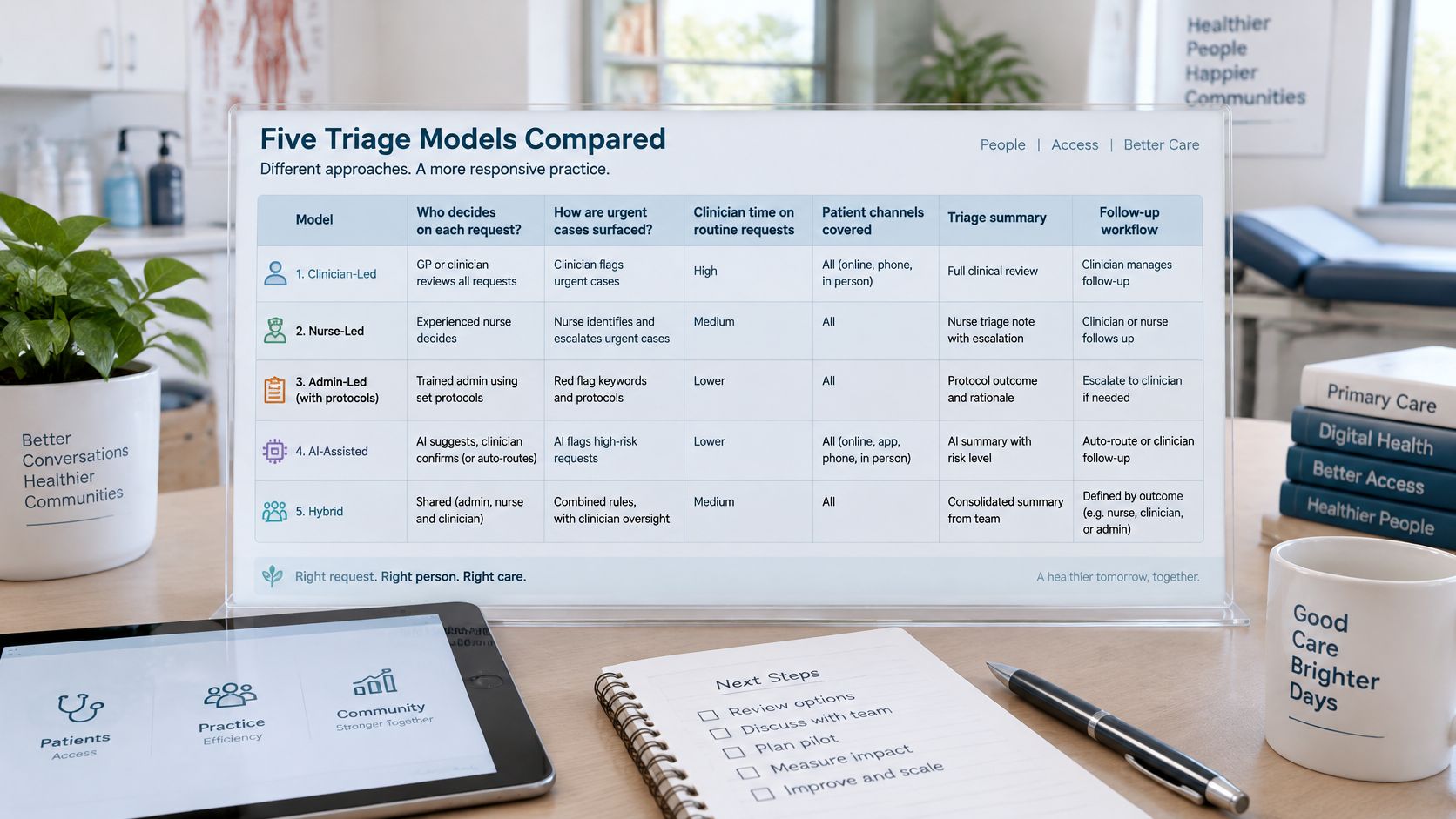
AI-assisted total triage deserves credit. Summaries, suggested priorities and consistent presentation help staff review faster, and for many practices that's a real improvement on unstructured forms.
The precise line: AI-assisted means a human still decides each request. Autonomous means the system does for routine cases, and clinicians receive pre-prioritised patients.
Channels also matter. NHS England digitally enabled triage guidance describes patients submitting through a website or app, while people who telephone or attend reception can have their information collected and entered into the digital triage process on their behalf. That supports a multi-channel model, but it doesn't make autonomous AI triage a contractual requirement, and the earlier models remain sensible steps where they fit local need. Autonomous triage is GP Triage's category.
Patients Who Cannot or Should Not Use Digital Triage
A digital-first comparison often skips the patients who matter most in an access assessment. Practices must offer online consultation while keeping telephone and in-person routes open, so no triage model should be assessed as a replacement for those routes.
Think about patients with limited digital skills, language barriers or disabilities. Think also about safeguarding concerns, coercive relationships and situations where someone else controls a patient's phone, email or record access. For those patients, starting an online request may be difficult, unsafe or impossible.
Assisted entry is an operating model, not a slogan
Assisted entry means reception collects the same information by phone or in person and enters it into the digital triage process on the patient's behalf. It keeps the patient in the same triage pathway without requiring them to use a website or app. It also creates work, training needs and privacy considerations that a supplier should explain plainly.
Ask these questions in writing before procurement.
- Assisted completion: Who completes assisted entry, where, and how long does it take in a busy reception?
- Abandoned requests: What happens when a patient starts a request, doesn't finish it, or gives incomplete information?
- Telephone route: How does the telephone route stay clear and prompt for patients who prefer it?
- Safeguarding: How are safeguarding concerns identified, recorded and handed to the right member of staff?
- Record access limits: How does the supplier handle situations where digital record access may need to be limited for a vulnerable patient?
Continuity and capacity sit alongside inclusion. Ask whether routing can protect continuity with a preferred clinician where the practice wants it, how much face-to-face capacity remains for patients who need it, and what clinical workload escalations create for duty teams.
A model that works only for confident digital users hasn't solved the access problem. It's solved access for the patients who were easiest to reach.
Clinical Safety and Assurance to Request
A Clinical Safety Officer shouldn't have to extract the assurance pack during a sales call. Ask for it upfront, for any supplier, and review it before workflow workshops begin.
Safety is also where the differences between models stop being theoretical. A tool that digitises or accelerates intake still leaves a clinician reading every request, so its assurance burden sits largely on the practice. A model that removes the manual step altogether carries more of it, because no one reviews the queue before prioritisation. The questions below apply either way, but they matter most where the vendor's system makes the first clinical decision.
Start with the documentation trail. Request DCB0129 manufacturer clinical safety documentation, and be clear about your own DCB0160 responsibilities as the deploying organisation, including local clinical risk management, hazard review and sign-off. Whatever device classification or regulatory status a supplier claims should be evidenced in that pack, not asserted in a pitch.
For GP Triage, we state the position in the approved form only. The triage module has performed over 27 million triages with zero critical errors. Treat that as a reported figure, not a guarantee: ask how it is defined, over what period, and how incidents are captured. Performance also depends on configuration, so the system must be configurable to the practice's safety model, with agreed thresholds, pathways and escalation routes owned locally.
Escalation is a clinical design question
We flag critical cases immediately by rapidly identifying and escalating high-priority medical concerns, but the detail still matters. Ask how red-flag presentations are flagged, who receives them, and within what timescale during and outside core hours. Ask whether routing differs by age group or presentation type, and where the line sits between what the system handles and what must still reach a clinician.
Also ask what happens when triage cannot be completed safely. A good answer names the fallback route, the responsible team and the patient-facing message.
The contractual position helps keep this proportionate. NHS England contractual guidance on online consultations states that practices are required from approximately 1 October 2025 to keep their online consultation tool available throughout core hours for at least non-urgent appointment, medication and administrative requests, while total triage itself is not a contractual requirement. Any automated pathway still needs safe urgency assessment, clear response expectations and a designed safety process.
Request details on escalation timings, failure modes, audit trails, incident reporting and who holds clinical responsibility for configuration. We meet the NHS Data Security and Protection Toolkit (DSPT) standards, we have completed a DTAC assessment, and we have DCB0129 documentation in place. Your CSO should still verify the current documents directly.
Interoperability with Clinical Systems and NHS Spine
Integration decides whether a triage model removes work or relocates it. If staff copy information between systems, reconcile bookings manually or chase missing summaries, the queue has changed shape rather than shrunk. A model that removes the manual triage step still fails that test if the booking output ends up somewhere the practice cannot reach.
GP Triage integrates with existing EHR systems for data synchronisation, and connects securely with the NHS Spine, so the booking outcome and the triage information stay aligned.
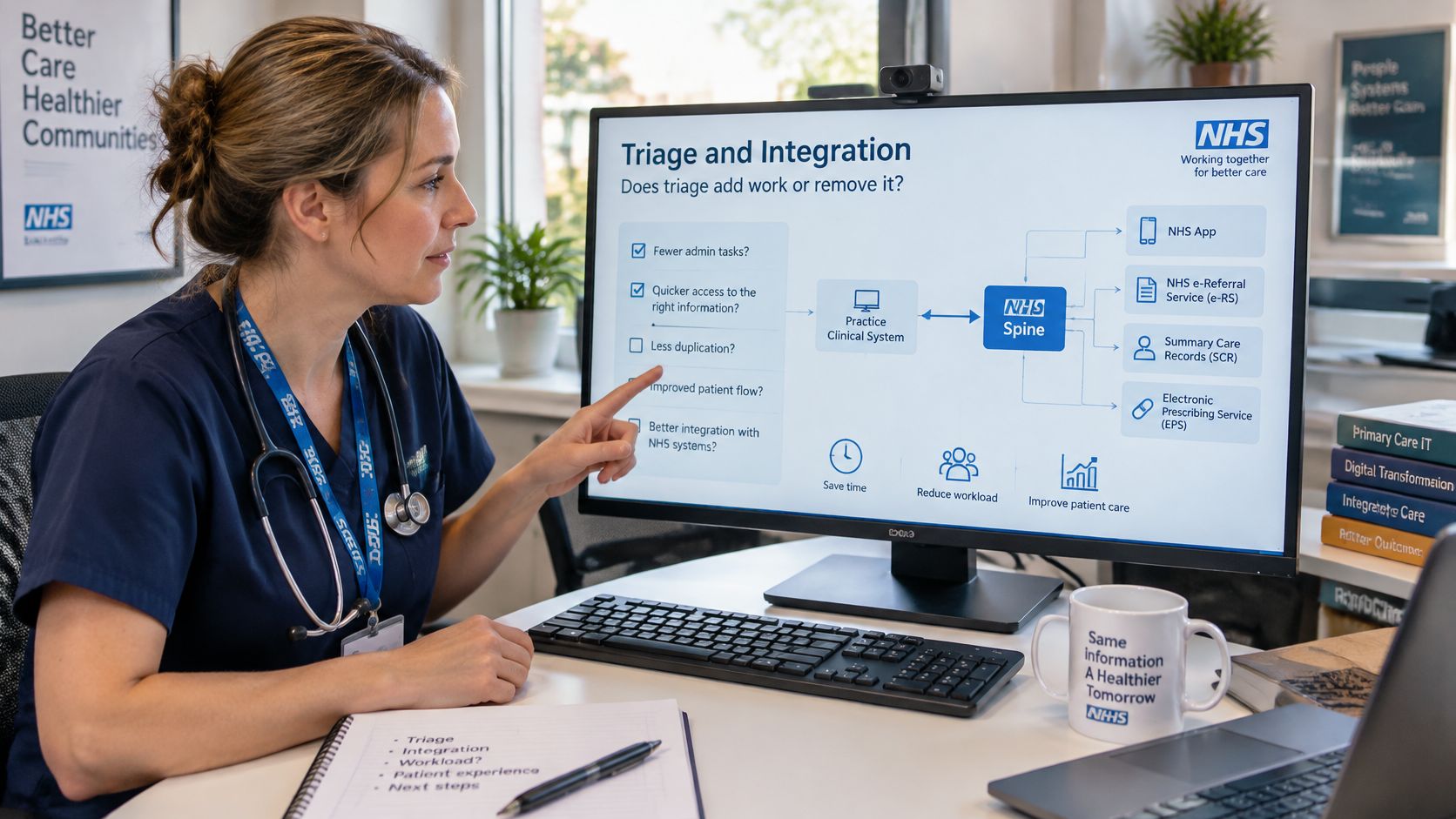
The direction of data flow
Our platform pushes a triage summary into the booking record. That's the correct direction for this use case. The clinician opening the appointment sees the triage outcome where the booking sits, without reception retyping the patient's answers.
Integration depth varies between suppliers, so pin it down before contract signature. Ask the supplier to state in writing which record-reading, coding and task-creation functions its integration supports, and agree how any gap will be handled before go-live. A workflow that depends on a function the integration doesn't provide needs a designed workaround, agreed in advance, rather than a gap discovered afterwards.
Ask for the integration route in writing too. That should cover the interoperability standards relied on, the data items sent and returned, and confirmation from your clinical system supplier that the route is supported for your practice configuration.
A practical pre-go-live test list
- Booking confirmation: Confirm that a successful booking returns to the triage platform and matches the appointment in the practice's clinical system.
- Failed transactions: Check how failures are flagged, who sees them, and how they're reconciled without duplicate appointments.
- Connector support: Confirm which party supports the connector, during which hours, and how incidents are escalated.
- Clinician view: Review how the triage summary appears in the booking record for the clinician who'll use it.
- Amendments and cancellations: Test what happens when an appointment is changed or cancelled after autonomous booking.
Say a booking fails overnight. Reception should see it on a clear exception list before the morning queue opens, not find it when the patient phones to ask where the appointment went.
Test failure handling as carefully as the happy path. That's where interoperability either protects staff time or consumes it.
Workflow, Automation and Reporting Impact
Under autonomous AI triage, reception moves from reading every request to handling exceptions, assisted entry and patients who need a person. Clinicians receive pre-prioritised patients, rather than spending session time opening routine submissions to decide where they belong.
Patients can access care around the clock via web, phone or in person, with the triage module gathering symptoms to start the process. That spreads intake beyond the morning peak, but it doesn't remove your need to plan capacity for the demand captured.
NHS England guidance on aligning capacity with demand in general practice recommends examining daily patterns in patient contacts and the types of need presented, then forecasting the amount and type of capacity required each day. It provides an appointment-data collection sheet, a demand-and-capacity spreadsheet and a digital-triage calculator for that work.
Measure for four weeks before go-live
I would record a baseline for approximately four weeks before changing the model, then compare like with like after go-live.
- Requests received: Count by channel, day and session.
- Requests triaged manually: Count how many need a reception or GP decision.
- Same-day response: Record whether patients receive a response the same day.
- Time to booking: Measure from request submission to a confirmed appointment.
Keep GP session hours separate from combined clinical and administrative operational hours in every report. Never mix the two in a single figure or chart.
Record triage activity as “clinical triage” in the appointment book, with the encounter mode captured for telephone, online and other routes. That keeps reporting comparable when your channel mix changes.
We provide actionable analytics for practices, PCNs and ICBs, tracking demand, workload and outcomes. Ask us to show exactly how each report definition matches your baseline, because a dashboard that counts differently will create an argument instead of evidence at the first review.
Case Studies and How to Roll Out Safely
Reference figures help only when you know what was measured. Use them to frame questions, not to assume the same result. The question worth asking of any case study is which step changed: did the model digitise the form, accelerate the review, reorganise the workflow, or remove the manual decision entirely? A faster queue is still a queue.
Reference practices and reported outcomes
| Reference practice | Scale | Reported outcome | Basis of measurement |
|---|---|---|---|
| Langton Medical Group, Lichfield | ~14,000 patients | 30 hours of GP-led triage removed per week (four GP sessions) five months after go-live, saving around £163,000 a year without expanding the team | GP-led triage hours only |
| One practice (unnamed) | List size not published | Over 420 hours recovered in the first four weeks | Combined clinical and administrative operational hours |
| Swanscombe Health Centre | List size not published | +31% patient adoption growth | Patient adoption, not clinician time |
Each row measures something different. The Langton figure is GP session time freed by removing the manual triage step. The 420-hour figure counts clinical and administrative time together. The Swanscombe figure shows uptake rather than time saved. Read across the table for what changed, not for a league ranking.
A safe rollout sequence
- Record the baseline: Run the four-week measurement plan and agree the definitions.
- Agree governance: Name DCB0160 ownership, clinical safety sign-off and incident routes.
- Configure the safety model: Set pathways, urgency thresholds and escalation arrangements for your practice.
- Brief the team: Train reception and clinicians on exception handling, assisted entry and escalation.
- Limit the first scope: Go live at a defined scope or session if that suits your risk appetite.
- Review at four weeks: Compare results against the baseline and decide what to expand, pause or reconfigure.
Change management isn't a launch email. Reception roles shift from queue processing to exception handling, and staff need confidence that urgent cases won't sit unseen. GPs need a clear view of escalation rules and of what arrives in the booking record. Patients who prefer the telephone need a route that still works, explained in plain language before go-live rather than after the complaints start.
"No more early morning phone calls or enduring endless queues. Thanks to GP Triage, patients can now conveniently access the care they require, precisely when they need it, without the usual hassle.", Dr. SG, GP Partner, Birmingham
Treat any testimonial as one practice's account. The decision to expand should rest on what your four-week review shows: start narrow, measure hard, and widen the scope only when the manual step is shrinking rather than moving elsewhere.
Confirming Your Next Step
Model the return from your own figures. A savings promise built on another practice's staffing, list size or triage volume tells you what was possible there, not what you will recover here.
GP Triage pricing is based on an annual per patient structure, with discounts available for PCNs, SNPs, Federations, Partnerships and ICBs. Ask for a quote directly, then run it against your own baseline before comparing it with any worked example.
The method, in order
Multiply your weekly triage volume by the average minutes each manual triage takes. That gives your current weekly triage load, which you can convert into hours.
Separate that load into GP session time and reception time by role. Apply your GP session cost only to GP-led triage, and apply reception costs only to reception handling. Keep the calculation split, even if you later present a combined operational view with the basis stated.
Compare the result with the quoted fee and with your baseline measures for same-day response and time from request to booking. If you use an illustrative figure in a business case, label it with the inputs that produced it: volume, minutes per triage, session cost and fee basis.
Then match your situation to a model using the quick pick table earlier in the guide. A digitised form still leaves a person reading and routing every request. An accelerated workflow shortens that reading time. A reorganised queue changes who does the reading. Only a model that removes the manual step for routine cases takes that cost off the rota. If a human decision on every request is a deliberate clinical choice for your practice, AI-assisted review may be the right endpoint instead.
We offer a free demo, bookable via the website. Bring your baseline figures, your assurance questions and your integration test list, and ask us to work through each one against your practice's safety model.
If routine requests still wait for a person to read and route them, GP Triage offers autonomous AI triage and booking that can remove that manual step for routine cases under your configured safety model. Visit GP Triage to book a free demonstration and test the model against your baseline, assurance pack and escalation requirements.


